To create an email list in Leadsleap takes just a few minutes, and you need to do it to store the contact details of your subscribers. When people enter their details into the Lead Capture Form they are stored in this list.
First click on the LIST MANAGER in the main menu, then click on the Add A New List button:

In the pop up box you need to give your list a name. I recommend you give this the same name as you have given the capture page that is going to be linked to it.

When you have added the list it will then need to be activated. To do that click on the little cog icon under the red text as shown below:

To activate the list you will need to complete the list customisation form with your own details. You also need to provide and confirm an email address where your subscribers will be able to contact you:

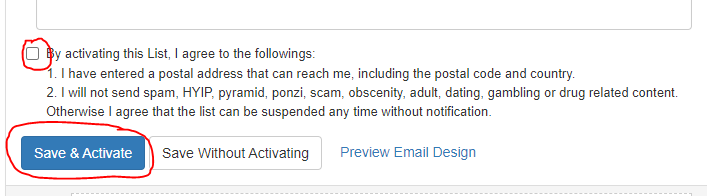
When you have completed the form click on check box to agree to the terms of use, then click the SAVE AND ACTIVATE button at the bottom
The list should now be showing as active:

After creating the email list you will need to connect it to the Lead Capture Page before you start promoting.
Click Here For Intructions To Connect The Lead Capture Page To The Email List